Introduction:
I have chosen graphic design, unity and UI design as my research subjects. I decided on these as they are all sections of games development I think are interesting, and are key aspects of my 3D game, so the information I gain from this research will benefit me greatly and can be applied to a variety of aspects when developing my game. I’m especially interested in graphic design, as I have exceled at it in the past and I shall specifically be researching into how effective logos are created and will apply this knowledge when we design our game logo. In addition, I will research into Unity, notably real time rendering. Research on Unity is crucial, as it’s the engine we’re using to develop the 3D game, the additional knowledge from my research therefore benefiting me greatly when creating the game and can be directly applied to it. Moreover, I intend to research into UI design, as a coherent and full understanding of this will give help my decision of what the most optimised layout will be for the game.
DISCLAIMER: Each “Specialist Skill” contains the Specialist AS WELL AS the critiquing of the Practitioner to save repeating myself.
Specialist 1 – Graphic Design (Logo Design):
As there are a lot of diffferent aspects of graphic design I have decided to focus on a couple of key features, those that are most relevant to my project; the first of which is logos and specifically what makes an effective logo.
They main function of a logo is to make a company recongisable, the easiest way to achieve a logo that’s recongisable is to make it simple (which is the current trend of logos), but it must be eye-catching enough to be noticed in the first place. A logo must manage all this while still maintaining assocaition with the company and it’s name. A good example of a effective logo is Mastercard.
Mastercard’s rebranded logo is simple yet effective. The use of the bold primary colours (red and yellow) creates a high visual impact as the shapes pop against the white background making it eye-catching and easily memorable, which is important in our media saturated society when we are constantly surronded by logos. The minimalistic designs also makes it modern and relatable to wide audience. Although the main testament to the effectivenss of the logo is the fact that it’s so widely recognised across the whole population.

http://justcreative.com/2017/06/04/2017-logo-design-trends-inspiration-gallery/, 16/11/17, 14:27.
Having designed many iconic and well known logos, Tom Geisman is an acclaimed graphic designer. He’s designed for companies such as Mobil Oil, National Geographic, New York University and many more. It’s apparent from interviews that Geaisman usually sketches design ideas onto paper and they’re transferred onto the computer later to present to companies. Once a decision has been made he uses the computer to finish the design and change features. While conducting research I couldn’t find the software used on the computers, so I can only assume he uses the industry standard for logo designing, which is Adobe Illustrator.
Having used Adobe Illustrator for many years, I can understand why it’s the industry standard and is used by so many graphic designers. Illustrator is the best software for logo design, as it has a plethora of features, which means that it’s effective for a varied number of projects and styles. However, it very r intuitive to navigate, meaning it easy and ‘user friendly’.
Specialist 2 – Unity:
Unity has some amazing games and films come from it. https://unity.com/madewith showcases an awful lot of these. An example of this is Adam. Adam was created to specifically showcase how amazing a film could look with real time rendering within the unity engine. This is a crazy feat to achieve, considering animated films usually take years to render on big rendering farms.
https://unity.com/madewith/adam
Neill Blomkamp and Mike Blomkamp created a company called Oats Studios, a company made to develop independent films.
According to madewithunity:
“To produce the next two ADAM installments, which are around six minutes each, Oats knew they had considerable technical challenges ahead of them. To realize their first-ever CG film “in engine,” they onboarded real-time rendering and artist-focused sequencing tools from Unity 2017.1.
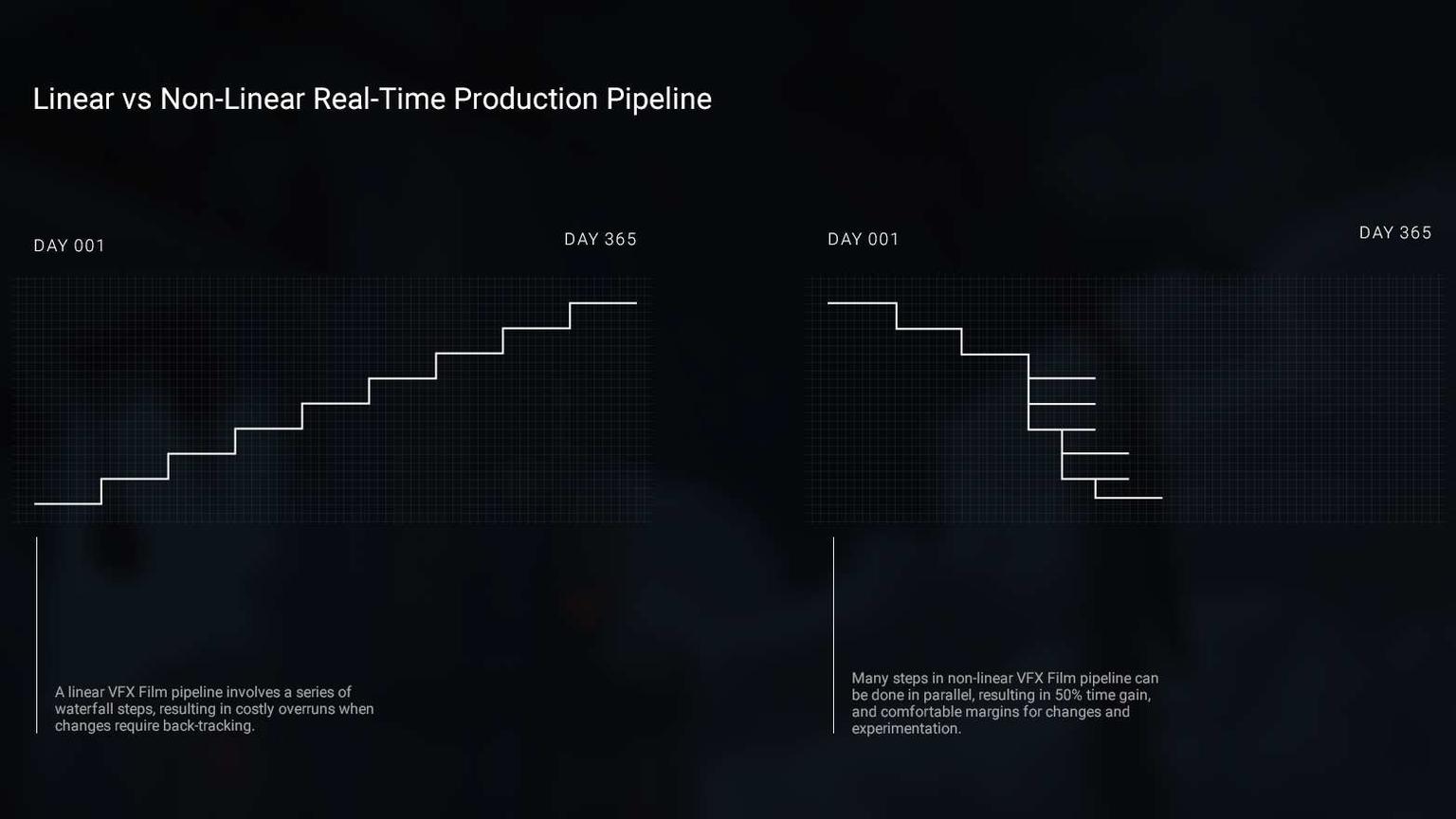
In just five months, the Oats team produced in real-time what would normally take close to a year using traditional rendering. “This is the future of animated content,” declares CG supervisor Abhishek Joshi, who was CG lead on Divergent and Game of Thrones. “Coming from offline, ray-traced renders, the speed and interactivity has allowed us complete creative freedom and iteration speed unheard of with a non-RT workflow.””
https://unity.com/madewith/adam#the-studio
In regards to the software used for this, it showcases how useful the Unity engine is. This puts emphasis on how it would be the right thing to make the game on the Unity Engine, given its rendering capabilities. Real time rendering dramatically cuts both the time taken and effort needed to create such a visually appealing game, meaning that other more important, behind-the-scenes things can be focused on, without the worry of diminishing the game play visual quality.
Even though Unity is useful, there are other alternatives. Unreal Engine has better lighting in engine, so could possibly be a better alternative, if not the same. The other point to be made is that even though this method is quicker, it may be more beneficial to still incorporate offline rendering. If some parts/scenes were offline rendered, the overall quality output could be increased, and the time taken to produce the video could still be greatly reduced in comparison to using offline rendering for the whole film.
Specialist 3 – UI Design:
UI Design is a massive part of Game Design. It defines the game. The UI needs to compliment both the gameplay and graphics. Making it flow well andf fit in is a must. A perfect example of this is the division (by Ubisoft). One book states that “Having a strong [UI] in your [product] is a good goal to have, but high-quality [UI] isn’t in and of itself a real goal. It’s the means to another, more important end that, though it’s easy to appreciate firsthand, is incredibly hard to describe”.
Personally, I think Ubisoft’s UI design is one of the best UI’s you will see in a game.

https://ubistatic19-a.akamaihd.net/ubicomstatic/en-US/global/media/ui_map_159341.jpg 17/01/18

https://static1.squarespace.com/static/55ef0e29e4b099e22cdc9eea/t/57bf2761d2b85743de04d5a9/1472145279359/?format=750w 17/01/18

https://cdn.segmentnext.com/wp-content/uploads/2016/03/The-Division-DLC-Locations-2-620×349.jpg 17/01/18
As shown in the above images, the UI isn’t just an “overlay” – its part of the game itself. Here is a perfect showcase as to how UI should be implemented.
One person who worked on the division UI is Piotr Michalczyk, designing icons and “redesigning existing screens”. For example, the menu’s and icons for different skills/perks. You can see more regarding this here. To design these, Michalczyk used Adobe Photoshop, but also used Adobe After Effects to design UI motion graphic concepts.
These pieces of software are instrumental in regards to designing effective UI. These as well as Adobe Illustrator are the industry standard, and the best software to use for anything art related. This cannot be criticized or critiqued as it is the highest quality using the best software available in this field.
Personal Plan
My Personal Plan is to work with Tom to build the game using the assets and sound created by the rest of the team. This will consist of building a basic working game and coding the game itself.
To do this we will be using the Unity Engine, as it’s live rendering capabilities will prove useful when tweaking and running the game in real-time. This also works very well with the Sony Dev Kit, which means that it will be very useful when looking for any issues. To make sure we are both on track, we will be sticking to a production schedule as close as we possibly can. This also takes into consideration any issues that could appear while developing the game, allowing for some breathing room where possible.
In Week One we will be working on the basics of the first Turret. This consists of the camera movement, turret positioning and if possible the shooting mechanic. This gives at least 1 days time per feature to make sure everything is working as intended. This is important as it will be useful to try and eliminate any issues we could possibly run into the future, so there is nothing that could put us behind schedule. Constant re-evaluation will make the game easier to debug, and will narrow down the area where the issue could be, streamlining the process.
Week Two will be more full on, consisting of harder tasks, the first of which will be the basic enemy AI. For this to work we will need to make sure that the player (in this case, the turret) is working properly with the camera. From there we will be able to get the AI to go towards the player. Within week two we will also need to look into random spawning of the AI, and then make sure that they can randomly spawn over a select area.
The second half of the game will be created in Week Three, looking at “duplicating” the current scene, and flipping it. It may be difficult to get the cameras to communicate, and get the camera toggle working by only pressing one key. After doing this, I will implement a basic menu to navigate in preparation for Week Four. The menu will be simple to navigate for the moment, only having a few options. For example, creating a new game, “saving” a current one, changing any basic settings and exiting the game.
For Week Four, Tom and I will be looking at navigating the menu to the game screen. Linking the two scenes may prove a little difficult as I do not have any previous experience with this, but it shouldn’t take too long. After this we will look into both spawn rate and a points system, again making sure that all bases are covered, re-evaluating our approach whenever possible to eliminate any underlying issues that may appear in the future. After this we will call a team meeting and discuss our next steps, as well as reviewing our current progress.
Learning Journal:
See the Learning Journal category
References:
- “2017 Logo Design Trends and Inspiration”. JustCreative. http://justcreative.com/2017/06/04/2017-logo-design-trends-inspiration-gallery/, Jacob Cass, 04/06/17. Web. 16 November 2017.
- “An Interview with Tom Geismar”. Logo Design Love. https://www.logodesignlove.com/tom-geismar-interview, N.p, 25/11/09. Web. 20 November 2017.
- “Tom Geismar”. Tom Geismar. http://tomgeismar.com/, N.p, 2017. Web. 20 November 2017.
- “Tom Geismar Interview”. Design Boom. https://www.designboom.com/design/tom-geismar-interview/, Andy Butler, 22/02/10. Web. 11 January 2018.
- “Adam by Oasts Studios”. Made with Unity. https://unity.com/madewith/adam, N.p, 13/10/17. Web. 16 November 2017.
- “Tom Clancy’s The Division (User Interface)”. Behance. https://www.behance.net/gallery/45621303/Tom-Clancys-The-DIVISION-(User-Interface)?, Piotr Michalczyk, 24/11/16. Web. 11 January 2018.
- “Tom Clancy’s The Division – UI Design”. HUDs and GUIs. https://www.hudsandguis.com/home/2013/06/26/tom-clancys-the-division-interface-design, N.p, 26/06/13. Web. 11 January 2018.
- “Effective UI: The Art of Building a Great User Experience in Software”. Page 6 – What a Good UX Accomplishes – Chapter 1: Building an Effective UI (https://www.amazon.co.uk/Effective-UI-Building-Experience-Software/dp/059615478X), Jonathon Anderson, John McRee, Robb Wilson and The EffectiveUI Team. 13/02/10. Paperback/Book. 18th January 2018.